用 Opus 5.5 搭动态设计工作室(三):seek(t) 引擎、弹簧与配乐
路线 A:两页文件搭起 seek(t) 渲染器;闭式弹簧让运动有质量;节拍网格上合成配乐。也给出 Remotion / HyperFrames 的路线 B。
本篇属于系列 用 Opus 5.5 搭动态设计工作室 · 第 3 篇
原文:How to build motion design studio with Opus 5.5 (Full-course),作者 Movez(@0xMovez),以 X Article 形式发布。
本站是中英对照排版:左栏是英文原文,右栏是对应的中文译文。专有工具名与术语(seek(t)、Opus 5.5、Playwright、ffmpeg、Remotion、HyperFrames、Claude Code 等)在通顺处保留英文写法;原文配图全部保留。
本文是系列《用 Opus 5.5 搭动态设计工作室》的第 3 篇,共 4 篇。承接第 2 篇,覆盖 07. Engine 至 09. Sound(含 Prefer a framework)。
07. Engine — build the seek(t) renderer
07. Engine —— 搭起 seek(t) 渲染器
This is route A, the one Opus picks by default, written out cleanly. Two files. The page paints any moment on demand, the renderer walks time and pipes frames into ffmpeg.
这是路线 A——Opus 默认挑的那条——写干净了。两个文件。页面按需画出任意时刻;渲染器沿时间走,把帧灌进 ffmpeg。
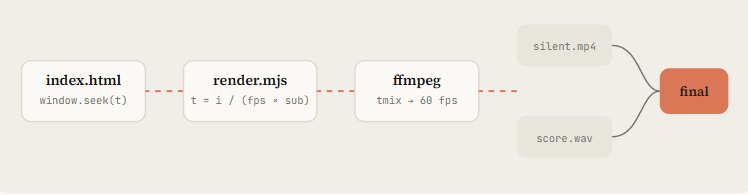
Figure: index.html (window.seek(t)) → render.mjs → ffmpeg (tmix → 60 fps) → silent.mp4 + score.wav → final
<style>html,body{margin:0;background:#141413}canvas{display:block}</style>
<canvas id="c" width="1080" height="1920"></canvas>
<script>
const W = 1080, H = 1920, DUR = 15;
const g = document.getElementById('c').getContext('2d');
const clamp = (x, a = 0, b = 1) => Math.min(b, Math.max(a, x));

// Closed-form damped spring, 0 → 1. Pure function of time (step 08 explains it).
function spring(t, k = 170, d = 26) {
  if (t <= 0) return 0;
  const w0 = Math.sqrt(k), z = d / (2 * w0);
  if (z < 1) {
    const wd = w0 * Math.sqrt(1 - z * z);
    return 1 - Math.exp(-z * w0 * t) * (Math.cos(wd * t) + (z * w0 / wd) * Math.sin(wd * t));
  }
  return 1 - Math.exp(-w0 * t) * (1 + w0 * t);      // z >= 1 treated as critical
}

// Seeded noise, never Math.random: the render must be identical every run
function rng(seed) { return () => { seed |= 0; seed = seed + 0x6D2B79F5 | 0;
  let t = Math.imul(seed ^ seed >>> 15, 1 | seed);
  t = t + Math.imul(t ^ t >>> 7, 61 | t) ^ t; return ((t ^ t >>> 14) >>> 0) / 4294967296; }; }

const SCENES = [
  { from: 0, to: 3, draw(t) {                        // kinetic title
      const s = spring(t - 0.1, 220, 22);
      g.save(); g.translate(W / 2, H / 2); g.scale(0.6 + 0.4 * s, 0.6 + 0.4 * s);
      g.globalAlpha = clamp(t * 4);
      g.fillStyle = '#F0EEE6'; g.font = '700 190px "Source Serif 4", serif';
      g.textAlign = 'center'; g.fillText('MOTION', 0, 0);
      g.fillStyle = '#D97757'; g.fillRect(-320 * s, 50, 640 * s, 18);
      g.restore();
  }},
  { from: 3, to: 6, draw(t) {                        // grid of squares on a stagger
      const r = rng(7);
      for (let i = 0; i < 48; i++) {
        const x = (i % 6) * 170 + 115, y = Math.floor(i / 6) * 170 + 360;
        const s = spring(t - i * 0.03 - r() * 0.1, 260, 20);
        g.fillStyle = i % 7 ? '#F0EEE6' : '#D97757';
        g.fillRect(x - 60 * s, y - 60 * s, 120 * s, 120 * s);
      }
  }},
  // ... more scenes: Opus appends here, one object per shot
];

function draw(t) {
  g.fillStyle = '#141413'; g.fillRect(0, 0, W, H);
  for (const s of SCENES) if (t >= s.from && t < s.to) s.draw(t - s.from);
}
window.seek = (t) => { draw(t); return true; };

// Live preview in a normal browser, off during headless render
if (!navigator.webdriver) {
  const t0 = performance.now();
  (function loop() { draw(((performance.now() - t0) / 1000) % DUR); requestAnimationFrame(loop); })();
}
</script>
// node render.mjs --fps 60 --dur 15 --sub 4
import { chromium } from 'playwright';
import { spawn } from 'node:child_process';
import { mkdirSync } from 'node:fs';
const arg = (k, d) => { const i = process.argv.indexOf('--' + k); return i > 0 ? Number(process.argv[i + 1]) : d; };
const FPS = arg('fps', 60), DUR = arg('dur', 15), SUB = arg('sub', 4);
mkdirSync('out', { recursive: true });
const browser = await chromium.launch();
const page = await browser.newPage({ viewport: { width: 1080, height: 1920 }, deviceScaleFactor: 1 });
await page.goto('file://' + process.cwd() + '/index.html');
await page.evaluate(() => document.fonts.ready); // canvas text needs loaded fonts
// tmix averages SUB consecutive subframes; select keeps the last of each group
const vf = `tmix=frames=${SUB},select='eq(mod(n\\,${SUB})\\,${SUB - 1})',setpts=N/${FPS}/TB`;
const ff = spawn('ffmpeg', ['-y', '-f', 'image2pipe', '-framerate', String(FPS * SUB), '-i', '-',
'-vf', vf, '-r', String(FPS), '-c:v', 'libx264', '-crf', '16', '-pix_fmt', 'yuv420p', 'out/silent.mp4'],
{ stdio: ['pipe', 'inherit', 'inherit'] });
const total = Math.round(DUR * FPS * SUB);
for (let i = 0; i < total; i++) {
await page.evaluate((t) => window.seek(t), i / (FPS * SUB));
const png = await page.locator('#c').screenshot({ type: 'png' });
if (!ff.stdin.write(png)) await new Promise((r) => ff.stdin.once('drain', r));
if (i % (FPS * SUB) === 0) console.log(`rendered ${i / (FPS * SUB)}s / ${DUR}s`);
}
ff.stdin.end();
await new Promise((r) => ff.on('close', r));
await browser.close();Contact sheet and QA helpers — render stills before you commit to a full pass:
Contact sheet 和质检辅助——全量渲染前先出静帧:
# Contact sheet: 2 frames per second, 6 across
ffmpeg -i out/final.mp4 -vf "fps=2,scale=270:-1,tile=6x5" -frames:v 1 out/contact.png

# Strip: 12 consecutive frames around a fast action at 4.2s (catch pops and overlaps)
ffmpeg -ss 4.1 -i out/final.mp4 -vf "scale=320:-1,tile=12x1" -frames:v 1 out/strip.png

# Phone test: how it reads at 360 px wide
ffmpeg -i out/final.mp4 -vf "fps=1,scale=360:-1,tile=5x3" -frames:v 1 out/phone.png

# Loop check: play it twice back to back and watch the seam
ffmpeg -stream_loop 1 -i out/final.mp4 -c copy out/loop_check.mp4

# Determinism check: frame 300 rendered twice must hash the same
node render.mjs --dur 5 --fps 60 --sub 1 && md5 out/silent.mp4   # run twice, compare
Embedded X post: https://x.com/i/status/2103483957266268381
Prefer a framework? Same prompt, route B
更想用框架?同一句 prompt,走路线 B
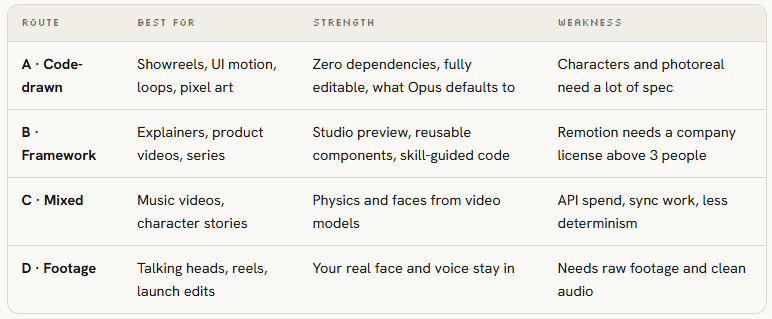
Figure: Route comparison — A code-drawn / B framework / C mixed / D footage: best for, strength, weakness
# Remotion (React): best for series, templates, data-driven videos
npx create-video@latest launch-film && cd launch-film
npx skills add remotion-dev/skills
claude
> /remotion-create a 20s 9:16 launch film for [PRODUCT], springs only, one accent color
npx remotion studio                 # live timeline preview
npx remotion render Main out/launch.mp4

# HyperFrames (HTML + GSAP): best when you think in web pages
npx hyperframes init my-video && cd my-video
npx hyperframes skills update
claude
> Using /hyperframes, turn ./notes.md into a 45-second pitch video with kinetic captions
npx hyperframes preview && npx hyperframes render
08. Springs — make motion feel expensive
08. Springs —— 让运动看起来贵
Cheap motion eases from A to B on a fixed curve. Expensive motion has mass: it accelerates, overshoots a hair, settles.
廉价运动是沿固定曲线从 A ease 到 B。昂贵运动有质量:加速、轻微过冲、再落稳。
The morph films all specify closed-form springs because they stay a pure function of time, which keeps seek(t) deterministic.
那些 morph 片子都点名闭式弹簧——因为它们仍是时间的纯函数,seek(t) 才能保持确定性。
The trick that most people miss: when a value changes target several times (a cursor, a container’s width), you don’t restart the spring.
多数人漏掉的技巧:一个值多次换目标时(光标、容器宽度),不要重启弹簧。
You add one spring per change, each starting at its own time. The motion stays continuous, and you can still render frame 812 without simulating frames 0 to 811.
每次变化加一根弹簧,各自从自己的时刻起算。运动保持连续,你仍能直接渲第 812 帧,而不必模拟 0 到 811。
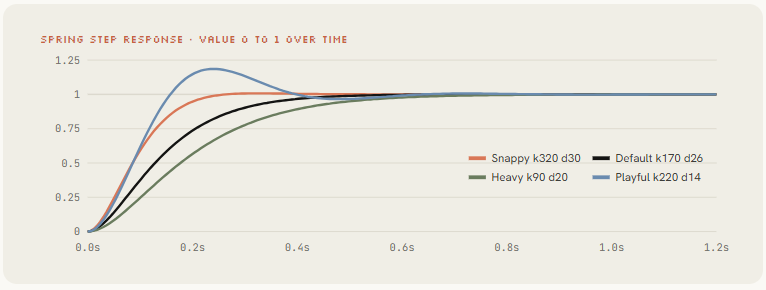
Figure: Spring step response (0→1) — Snappy / Playful / Default / Heavy presets (k, d)
// keys: [[time, value], ...] sorted by time. Returns the value at t.
export function track(t, keys, k = 170, d = 26) {
  let v = keys[0][1];
  for (let i = 1; i < keys.length; i++)
    v += (keys[i][1] - keys[i - 1][1]) * spring(t - keys[i][0], k, d);
  return v;
}

// A tab indicator that stretches: leading edge is stiffer than trailing edge
export function indicator(t, stops) {             // stops: [[time, x], ...]
  const lead  = track(t, stops, 320, 30);
  const trail = track(t, stops, 140, 22);
  return { left: Math.min(lead, trail), right: Math.max(lead, trail) + 120 };
}

// Text inside a morphing box: in after the morph starts, out before the next one
export function swapAlpha(t, tIn, tOut) {
  return Math.min(clamp((t - tIn - 0.08) / 0.12), clamp((tOut - 0.1 - t) / 0.1));
}

// Seamless loop: pin the last frame to the first
export const loopT = (t, dur) => ((t % dur) + dur) % dur;
Spring presets:
- Snappy UI: buttons, toggles, leading edges
- Default: cards, containers, camera
- Heavy: big type, 3D objects, logo lockups
- Playful: mascots, stickers (visible overshoot)
弹簧预设:
- Snappy UI:按钮、开关、前缘
- Default:卡片、容器、镜头
- Heavy:大字、3D 物体、logo 定格
- Playful:吉祥物、贴纸(看得见过冲)
Embedded X post: https://x.com/i/status/2102435511222890900
A one-pass refactor prompt that works: “Replace every easing curve with closed-form springs from lib/motion.js. Tiny overshoot on UI, none on type. Any value with more than one target uses track().” Opus refactors the whole file in one pass.
一句管用的一遍重构 prompt:「把每条 easing 曲线都换成 lib/motion.js 里的闭式弹簧。UI 允许轻微过冲,文字不要。任何有多个目标的值都用 track()。」Opus 会一遍重构完整个文件。
09. Sound — score it to the beat
09. Sound —— 把片子卡到节拍上
Rob Hallam thought the audio was added in post. It wasn’t.
Rob Hallam 以为音频是后期加的。不是。
@oozn’s Steve Jobs film synthesized its soundtrack in Node with every cut locked to 120 BPM.
@oozn 的 Steve Jobs 片子在 Node 里合成了整条配乐,每个剪辑都锁在 120 BPM。
Vox’s “small print” piece synthesized music in Python and then polished the render second by second against it. Sound is where “AI video” starts feeling like a film.
Vox 的「small print」用 Python 合成音乐,再对着它一秒一秒打磨渲染。声音,是「AI 视频」开始像电影的地方。
Embedded X post: https://x.com/i/status/2103495232637882858
Two paths. If you supply a track, measure it. If you don’t, synthesize it on the same timeline as the picture.
两条路。你有现成曲,就量它。没有,就在同一时间线上合成——和画面共用一条时间轴。
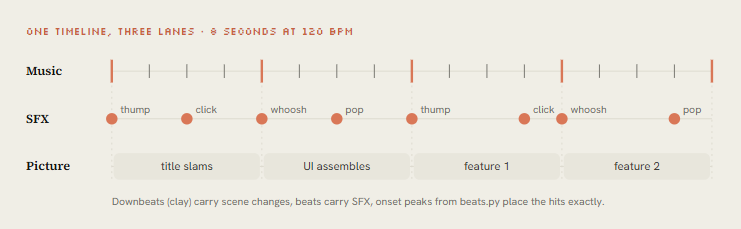
Figure: One timeline, three lanes · 8 seconds at 120 BPM — downbeats carry scene changes, beats carry SFX, onset peaks from beats.py place the hits
# python beats.py song.wav > beats.json   (the animation reads this file)
import sys, json, numpy as np, librosa

y, sr = librosa.load(sys.argv[1], sr=None, mono=True)
tempo, frames = librosa.beat.beat_track(y=y, sr=sr, units="frames")
beats = librosa.frames_to_time(frames, sr=sr).round(3).tolist()

onset = librosa.onset.onset_strength(y=y, sr=sr)
peaks = librosa.util.peak_pick(onset, pre_max=3, post_max=3, pre_avg=3,
                               post_avg=5, delta=0.5, wait=10)
json.dump({
    "bpm": float(np.atleast_1d(tempo)[0]),
    "beats": beats,                                   # state changes go here
    "downbeats": beats[::4],                          # big moments go here
    "hits": librosa.frames_to_time(peaks, sr=sr).round(3).tolist(),  # SFX go here
}, sys.stdout, indent=1)
Embedded X post: https://x.com/i/status/2103707054108299437
Embedded X post: https://x.com/i/status/2103465246014746943
Steve Jobs biopic: Remotion + SVG, 23 transitions, soundtrack synthesized in Node, cuts on 120 BPM.
Steve Jobs 传记片:Remotion + SVG,23 次转场,Node 合成配乐,剪在 120 BPM 上。
Proof that code-synthesized music can carry a 2-minute film.
证明:代码合成的音乐撑得住两分钟片子。
Embedded X post: https://x.com/i/status/2103315922098470926
“Small print”: story, frames and music all by Opus, rendered with HyperFrames. Python-synthesized music, then a second-by-second polish pass.
「Small print」:故事、画面和音乐都是 Opus,用 HyperFrames 渲染。Python 合成音乐,再做逐秒打磨。
Embedded X post: https://x.com/i/status/2102531681450119426
Embedded X post: https://x.com/i/status/2103273003555402193
- Part 4 · From one clip to a studio
- 第 4 部分 · 从一条片子到一座工作室
→ 上一篇:(二)品牌、参考与状态清单 · 下一篇:(四)导演简报、自审与交付
→ 上一篇:(二)品牌、参考与状态清单 · 下一篇:(四)导演简报、自审与交付
讨论
这里是静态站点,没有内嵌评论区。如果这篇文章对你有用,欢迎通过 RSS 订阅后续更新。