用 Opus 5.5 搭动态设计工作室(二):品牌、参考与状态清单
把 showreel 对准你的产品:给 URL、真截图和音乐;用一帧参考锁住风格;再用 XML 式状态清单代替「感觉对了」。提示词从一句话升到可执行的规格。
本篇属于系列 用 Opus 5.5 搭动态设计工作室 · 第 2 篇
原文:How to build motion design studio with Opus 5.5 (Full-course),作者 Movez(@0xMovez),以 X Article 形式发布。
本站是中英对照排版:左栏是英文原文,右栏是对应的中文译文。专有工具名与术语(seek(t)、Opus 5.5、Playwright、ffmpeg、Remotion、HyperFrames、Claude Code 等)在通顺处保留英文写法;原文配图全部保留。
本文是系列《用 Opus 5.5 搭动态设计工作室》的第 2 篇,共 4 篇。承接第 1 篇,覆盖 04. Brand 至 06. Spec。
04. Brand — point the reel at your product
04. Brand —— 把 reel 对准你的产品
Tony Dinh’s post is the most useful for anyone selling something. He paid over $1,000 for a similar launch video a year ago; this took under 30 minutes.
对要卖东西的人来说,Tony Dinh 那条帖最管用。一年前他为一支类似的发布片付了超过 1000 美元;这次不到 30 分钟。
Three extra lines did it: the product URL, “use actual product screenshot, logo, assets”, and “must have music”. Opus went to the site and gathered the assets itself.
多出来的三行就够了:产品 URL、「用真实产品截图、logo 和素材」,以及「必须有音乐」。Opus 自己上站点把资产收齐。
Rob Hallam proved the second half: after his first reel, he asked for a product ad in the same chat, and it came out faster because the renderer, audio synth and export pipeline already existed.
Rob Hallam 证明了后半截:第一条 reel 之后,他在同一会话里要产品广告,出来更快——因为渲染器、音频合成和导出管线已经在了。
Keep one session per brand.
一个品牌开一个会话,别混。
Embedded X post: https://x.com/i/status/2102572941699354900
- Shows: TypingMind reel in under 30 minutes, replacing a $1,000+ agency video. Full prompt is in the second reply.
- 展示:不到 30 分钟的 TypingMind reel,替掉一支 1000+ 美元的代理商片子。完整 prompt 在第二条回复里。
Embedded X post: https://x.com/i/status/2102801274173587569
- Why here: Place under the brand prompt so readers can compare his 3 extra lines with the template.
- Shows: Pocketsflow reel with a talking character voiced through ElevenLabs.
- 放在这里:贴在品牌 prompt 下面,方便读者拿他多出来的 3 行和模板对照。
- 展示:带说话角色的 Pocketsflow reel,声音走 ElevenLabs。
achxvi took the same idea further with a talking character: the Pocketsflow version passed an ElevenLabs key and asked for a character who explains the product. Voice plus mascot is what he now sells as a service.
achxvi 把同一思路推得更远:Pocketsflow 版塞进 ElevenLabs key,并要求一个讲解产品的角色。声音加吉祥物,就是他现在当服务在卖的东西。
Put API keys in .env and write “the ElevenLabs key is ELEVENLABS_API_KEY in .env”. Never paste a real key into a prompt you’ll screenshot. achxvi’s public prompt used a joke placeholder for exactly this reason.
API key 放进 .env,prompt 里写「ElevenLabs key 是 .env 里的 ELEVENLABS_API_KEY」。永远别把真 key 贴进你准备截图的 prompt。achxvi 公开版用了玩笑占位符,就是这个原因。
05. Reference — name a look, feed a frame
05. Reference —— 点名一种样子,喂进一帧
Without a reference, Opus falls back to its default: centered text, gradient background, everything fading in.
没有参考时,Opus 会退回默认:居中文字、渐变背景、全员淡入。
Rexan Wong went through dozens of viral clips and found the same thing: naming a style beats describing one, and a reference video or frame gives the model pacing, type and transitions to copy.
Rexan Wong 翻过几十条爆款,结论一样:点名一种风格,比干描述一种更管用;参考视频或单帧能给模型可抄的节奏、字体和转场。
Pleometric’s two posts show the ladder. The pure-code TikTok piece started from a single frame of another viral animation.
Pleometric 的两条帖画出了阶梯。那条纯代码 TikTok,起点就是另一条爆款动画的一帧。
The Donald-style piece pointed Opus at his own PC-98 image gallery. Your own library is a reference nobody else can copy.
Donald 风的那条,把 Opus 指向他自己的 PC-98 图库。你自己的素材库,是别人抄不走的参考。
- A frame: screenshot one frame of a video you love, attach it, say what to take (palette, type, grain) and what not to take (subject).
- A video: give Opus the file or link and ask it to extract frames with ffmpeg and describe pacing shot by shot before writing code.
- A library: a folder of your images or past work. Ask Opus to write a style_guide.md from it first.
- Sources: whatships.com (launch videos), Dribbble motion, your competitors’ launch films.
- 一帧:截你喜欢的片子里的一帧,附上,说清楚要什么(色板、字体、颗粒)和不要什么(题材)。
- 一条视频:给 Opus 文件或链接,先让它用 ffmpeg 抽帧,再逐镜描述节奏,然后才写代码。
- 一座库:你的图片或旧作文件夹。先让 Opus 据此写出 style_guide.md。
- 来源:whatships.com(发布片)、Dribbble motion、竞品的发布影片。
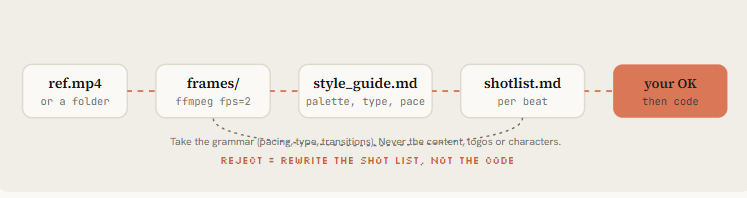
Figure: ref.mp4 → frames/ → style_guide.md → shotlist.md → your OK, then code. Reject = rewrite the shot list, not the code
Embedded X post: https://x.com/i/status/2103482545111232946
Pleometric suggested p5.js and Opus chose to write its own paper renderer. When you give a reference, let the model pick the technique.
Pleometric 提过 p5.js,Opus 却选择自己写纸质感渲染器。你给参考时,手法交给模型挑。
Specify the look and the constraints, not the library, unless you need a specific framework for reuse.
写明样子和约束,而不是写死库——除非你为了复用必须钉死某个框架。
Shows: Why most “one prompt” videos look the same, and the reference + framework + components fix.
展示:为什么多数「一句 prompt」片子长得一样,以及 reference + framework + components 怎么治。
Reference: ./refs/launch.mp4 (and ./refs/frames/*.png)

1. Extract one frame every 0.5s with ffmpeg. Study them.
2. Write ./docs/style_guide.md: palette (hex), type (family, weight, tracking),
   shot lengths, transition types, camera moves, texture/grain, how text enters and exits.
3. Write ./docs/shotlist.md for a [DURATION]s video about [SUBJECT] in THAT style.
   Take the grammar of the reference, never its content, logos or characters.
4. Show me both files. Wait for my OK before any code.
“Its TikTok feed” animation, pure code, started from one frame of another viral piece. The single-frame reference in action.
「它的 TikTok 信息流」动画,纯代码,起点是另一条爆款的一帧。单帧参考的现场演示。
06. Spec — write the state list, not the vibe
06. Spec —— 写状态清单,别写氛围
The most-bookmarked prompt of the week wasn’t a one-liner.
当周收藏最多的 prompt,不是一句话。
@twoclipping’s UI morph (907K views, 19K bookmarks) and @verbove’s MakerMap film both used an XML spec: inputs to ask for, direction, a beat-by-beat state list, build rules, and gotchas. NFT_Chen’s editor film is the same idea as a story: a fake UI is a set where every element has a known state.
@twoclipping 的 UI morph(90.7 万播放、1.9 万收藏)和 @verbove 的 MakerMap 片子都用了 XML 规格:要问的输入、方向、逐拍状态清单、构建规则和坑点。NFT_Chen 的编辑器片子是同一思路的故事版:假 UI 就是片场,每个元素都有已知状态。
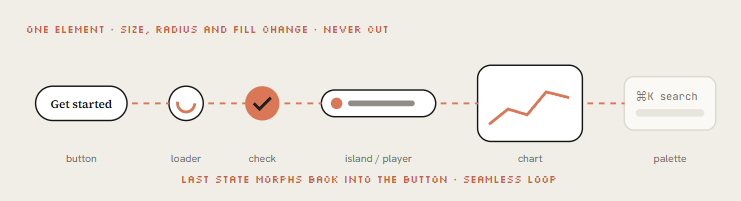
Figure: One element · size, radius and fill change · never cut out. Last state morphs back into the button · seamless loop
The concept behind them: one shape, never cut. A single element morphs size, radius and color from state to state (button, loader, player, slider, chart, command palette), a cursor drives each change with real clicks, and the last frame equals the first so it loops.
背后的概念:一个形状,永不切走。单一元素在状态之间 morph 尺寸、圆角和颜色(按钮、loader、播放器、滑块、图表、命令面板),光标用真实点击驱动每次变化,末帧等于首帧以便循环。
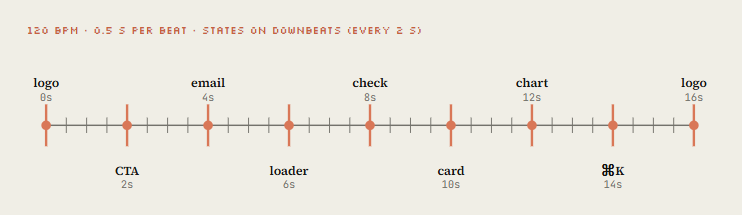
Figure: 120 BPM · 0.5 s per beat · states on downbeats (every 2 s): logo → CTA → email → loader → check → card → chart → ⌘K → logo
Here is my own template built on that structure; the originals are linked in the resources.
下面是我按同一结构写的模板;原版链接在资源区。
# Motion studio rules

## Render contract
- Every film is a pure function of time: `window.seek(t)` paints frame t.
- No CSS transitions, no setTimeout, no requestAnimationFrame in render mode,
  no state carried between frames. Seeded noise only (mulberry32), never Math.random.
- Render with `node render.mjs`, encode H.264 yuv420p, CRF 16.

## Look
- Banned defaults: centered title on gradient, everything fading in,
  corner labels and frame borders, glow on UI chrome, generic particle bursts.
- One display face, one UI face. One accent color unless the brief says otherwise.
- Every 2 to 4 seconds something new must happen on screen.

## Sound
- Score and SFX are synthesized in code unless a track is supplied.
- Place hits on the measured beat grid (beats.json). Loudness -14 LUFS.

## Loop before you show me anything
1. Render one frame per beat as a contact sheet and LOOK at it.
2. Score it 1-10 on: hook in first 2s, readability at phone size,
   motion quality, variety, brand accuracy, sound sync.
3. Fix the 3 worst problems. Repeat until every score is 8+.
4. Only then do the full render.
Embedded X post: https://x.com/i/status/2102436464323661880
The UI morph loop (907K views) with the open-sourced XML template in the thread. The original of the spec pattern.
UI morph 循环(90.7 万播放),线程里开源了 XML 模板。规格范式的原版。
MakerMap: one shape morphing through the whole product, real data, one HTML file. Shows the same spec applied to a real product.
MakerMap:一个形状 morph 完整个产品,真实数据,一个 HTML 文件。同一规格落到真实产品上。
Embedded X post: https://x.com/i/status/2103918792845963545
Opus codes a cartoon video editor and edits inside it: timeline, waveform, export button, all drawn.
Opus 写了一个卡通视频编辑器,并在里面剪:时间线、波形、导出按钮,全是画出来的。
UI as a film set, the story version of the spec approach.
UI 当片场——规格思路的故事版。
<inputs>
Ask me for: my product + URL, 8 to 12 UI states that tell its story, the real data shown in
each state, brand colors + fonts + one accent, a royalty-free track near 120 BPM, formats.
</inputs>

<direction>
Product-film UI motion. One container never cuts: every state is the same element changing
size, radius and fill while its content swaps behind a short blur. A cursor drives every change.
Warm neutral canvas, one accent. Springs with at most a tiny overshoot.
Banned: bouncy easing, glows, gradients on UI chrome, particle bursts, dead time.
</direction>

<structure>
120 BPM, 8 bars, something happens on every beat.
logo → CTA button → email field (typed) → loader → success check → dashboard card
→ chart draws itself → tooltip on hover → ⌘K palette → toast → logo.
</structure>

<build>
1. One HTML file, one canvas, window.seek(t). No CSS transitions, no timers, no carried state.
2. Closed-form springs. A value with many targets = sum of one spring per change.
3. Text inside a morphing container enters after the morph starts, leaves before the next one.
4. Tab indicators: leading and trailing edges on different springs so they stretch.
5. Beat grid from the track (numpy/librosa). Start on a downbeat. UI sounds on measured peaks.
6. Render in headless Chrome at 60 fps, 4 subframes per frame, blended for motion blur.
</build>

<gotchas>
Never use will-change on anything the camera scales (blurry text).
The last frame must equal the first, cursor position and velocity included.
</gotchas>

<start>
Ask for the inputs, then show me the state list on the beat grid before writing code.
</start>- Part 3 · Build the engine
- 第 3 部分 · 搭引擎
→ 上一篇:(一)像素、环境与一句话片头 · 下一篇:(三)seek(t) 引擎、弹簧与配乐
→ 上一篇:(一)像素、环境与一句话片头 · 下一篇:(三)seek(t) 引擎、弹簧与配乐
讨论
这里是静态站点,没有内嵌评论区。如果这篇文章对你有用,欢迎通过 RSS 订阅后续更新。