用 Opus 5.5 搭动态设计工作室(四):导演简报、自审与交付
从一夜导演简报到让 Opus 回看自己的帧,再到多画幅导出、打包成 skill、甚至卖成服务。一句话换来片子,harness 换来工作室。
本篇属于系列 用 Opus 5.5 搭动态设计工作室 · 第 4 篇
原文:How to build motion design studio with Opus 5.5 (Full-course),作者 Movez(@0xMovez),以 X Article 形式发布。
本站是中英对照排版:左栏是英文原文,右栏是对应的中文译文。专有工具名与术语(seek(t)、Opus 5.5、Playwright、ffmpeg、Remotion、HyperFrames、Claude Code 等)在通顺处保留英文写法;原文配图全部保留。
本文是系列《用 Opus 5.5 搭动态设计工作室》的第 4 篇(终篇),共 4 篇。承接第 3 篇,覆盖 10. Overnight 至 Conclusion(含 Repos to clone)。
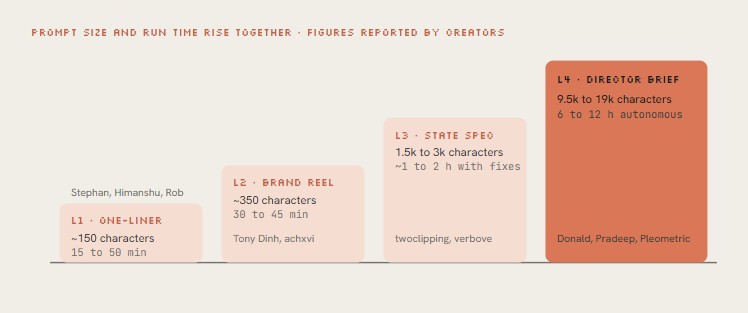
Figure: Prompt size and run time rise together — L1 one-liner → L2 brand reel → L3 state spec → L4 director brief (figures reported by creators)
10. Overnight — write the director’s brief
10. Overnight —— 写好导演简报
Donald dictated for five minutes, went to sleep, and woke up to a 142-second music video with 2.1M views.
Donald 口述了五分钟,去睡觉,醒来是一支 142 秒、210 万播放的 MV。
His public prompt runs about 9,500 characters. @pradeepXkapoor’s “Pip” robot film used a 19,000-character brief. Read either and you see the same skeleton: they don’t describe a video, they hire a crew.
他公开的 prompt 大约 9500 字符。@pradeepXkapoor 的「Pip」机器人片子用了 19000 字符简报。读任意一份,骨架都一样:他们不是在描述一条视频,而是在雇一组人。
- Film in one line. The logline and the joke, so every decision can be checked against it.
- References. Source video, song, image library, a GitHub repo of prior work. What to keep, what to push.
- Tools & keys. Skills to load, APIs available (image, video, voice), budget, where docs live. “Spend it economically.”
- Character bible. Proportions, palette sampled from a sheet, expressions, an identity lock that survives every style change.
- Beat sheet. Acts with timestamps, a visual payoff every 3 to 5 seconds, a hook in the first 2.
- Text on screen. When lyrics or captions go huge, when they sit like subtitles. Composition leaves room for them.
- Workflow gates. Plan → rig → stills → animatic → full pass → polish → audio → render. Don’t skip gates.
- Critique loop. Render stills, score them, write the 3 worst problems, fix, repeat until every score is 8+.
- Deliverables. Final MP4, loop check, poster frame, contact sheet, clean source with a README.
- 一句话定片。 Logline 和梗,好让每个决定都能拿来对照。
- 参考。 源视频、歌、图库、旧作 GitHub。要留什么、要推什么。
- 工具与 key。 要加载的 skills、可用 API(图 / 视频 / 声)、预算、文档在哪。「省着花。」
- 角色圣经。 比例、从色板采样的配色、表情、跨风格仍锁得住的身份。
- 节拍表。 带时间戳的幕,每 3 到 5 秒一个视觉回报,前 2 秒有钩子。
- 屏上文字。 歌词或字幕何时放大、何时当字幕趴着。构图给它们留空。
- 流程闸门。 计划 → 绑定 → 静帧 → animatic → 全量 → 打磨 → 音频 → 渲染。别跳闸。
- Critique loop。 渲静帧、打分、写下最糟的 3 个问题、修、重复到每项 8+。
- 交付物。 终版 MP4、循环检查、海报帧、contact sheet、带 README 的干净源码。
Open out/contact.png, out/strip.png and out/phone.png and look at them properly.
Be a harsh motion director, not a proud author.

Score 1-10: hook in first 2s · readability at phone size · motion quality (springs,
no dead frames) · variety (new thing every 2-4s) · composition · brand accuracy · sound sync.

List the 3 biggest problems with timestamps. Hunt specifically for: text overlapping during
swaps, anything sliding instead of easing, corner labels and frame borders, centered-on-gradient
shots, blurry scaled text, a dead beat with nothing happening, a stutter at the loop seam.

Fix them, re-render only the affected seconds, show me the new contact sheet and new scores.
The key move in Donald’s brief is generate-then-trace. Seedance 2.5 renders base shots with characters and physics, then Opus redraws the whole video in JavaScript on top, so the viewer only sees the code-drawn layer.
Donald 简报里的关键一手是 generate-then-trace:Seedance 2.5 先渲带角色和物理的底片,再由 Opus 用 JavaScript 整片重绘盖上去——观众只看见代码画的那一层。
Video models give motion that’s hard to hand-code; the JS layer gives a consistent, ownable look. Pleometric re-ran the same brief with his own gallery and got a completely different film.
视频模型给出难手写的运动;JS 层给出一致、可据为己有的样子。Pleometric 拿同一份简报换上自己的图库,得到完全不同的片子。
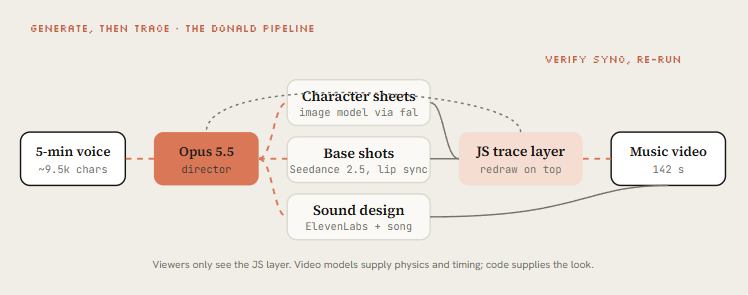
Figure: GENERATE, THEN TRACE · the Donald pipeline — 5-min voice → Opus as director → character sheets / base shots / sound → JS trace layer → 142 s music video
“Spoke to my computer for 5 mins, Claude worked for 12 hours.” The Claude Pop music video, 2.1M views. The headline example of L4.
「对着电脑说了 5 分钟,Claude 干了 12 小时。」Claude Pop MV,210 万播放。L4 的头条样板。
Embedded X post: https://x.com/i/status/2104014659615392078
The full ~9,500-character dictated brief. Readers compare it against the director-brief template below.
完整约 9500 字符的口述简报。读者拿它和下方导演简报模板对照。
You are the director, animator, sound designer and render engineer for a [DURATION] film
made in code. Treat this as a multi-session production. Don't rush to a final render.

## The film in one line
[LOGLINE. What the viewer should feel at the end.]

## References and inputs
- ./refs/ : [video / frames / image library]. Take the grammar, never the content.
- ./audio/track.wav : use it unchanged. Measure beats with beats.py first.
- Skills available: [/remotion-best-practices | /hyperframes | /claude-animation].
- APIs in .env: [ELEVENLABS_API_KEY, FAL_KEY]. Budget: [$X]. Be economical.

## Look
[3-5 lines: palette, type, texture, camera language. Banned looks.]

## Beat sheet
0:00-0:02  hook: [the single most striking image]
0:02-0:10  [act 1]
...        a new visual payoff every 3-5 seconds
[END]      the last frame sets up the first frame (loop)

## Workflow, with gates
1. Write docs/style_guide.md and docs/shotlist.md (every shot: frames, camera, text, SFX).
   Show me the shot list. Then continue without waiting if I don't answer in 10 minutes.
2. Build stills for every shot. Contact sheet. Critique.
3. Animatic at 960x540 with placeholder audio. Fix pacing before polish.
4. Full animation, polish pass, sound pass, final render.
5. Split work across subagents per chapter. Write docs/ANIMATION_GUIDE.md first
   so every subagent codes in the same style.

## Critique loop (every shot, at least 3 rounds)
Render 3-5 stills, score 1-10 on: hook, readability at 360px wide, motion, composition,
depth, sound sync, polish. Log scores + 3 biggest problems in docs/review_log.md. Fix. Repeat
until all are 8+.

## Deliverables
out/final.mp4 · out/loop_check.mp4 · out/poster.png · out/contact.png · README.md
Donald’s brief re-run with a PC-98 gallery; a mixed flow with bugs left in to keep it one-pass.
Donald 简报换 PC-98 图库重跑;混合流程里故意留 bug,好保持一遍过。
John Heibel’s PDoom repo (1.1K stars) shows the subagent pattern for real: Opus wrote ANIMATION_GUIDE.md to brief the subagents it ran in parallel and STORYBOARD.md after the first generation, with nine chapters in src/ch/. Ask for both files by name.
John Heibel 的 PDoom 仓库(1.1K stars)把 subagent 范式落到实处:Opus 先写 ANIMATION_GUIDE.md 给并行 subagent 做简报,初代之后再写 STORYBOARD.md,九章在 src/ch/。两个文件都要按名字点名要。
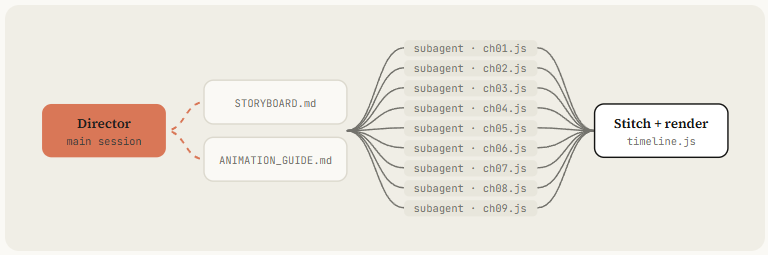
Figure: Director (main session) → STORYBOARD.md + ANIMATION_GUIDE.md → nine subagents (ch01.js…ch09.js) → Stitch + render (timeline.js)
Embedded X post: https://x.com/i/status/2103703135902740699
11. Critique — make Opus watch its own frames
11. Critique —— 让 Opus 回看自己的帧
Opus 5.5 reads images. That means it can look at what it rendered, and this single habit separates the clips that went viral from the ones posted with “it’s a bit mid”.
Opus 5.5 能读图。这意味着它能看着自己渲出来的东西——这一条习惯,就把走红的片子和配文「有点 mid」的区分开了。
@mablesjoseph’s watercolor short was upfront about it: 163 model calls and nearly seven hours, not one shot. Drew’s launch-day piece had visible cleanup rounds too. Iteration is the method, not a failure.
@mablesjoseph 的水彩短片说得很直白:163 次模型调用、将近七小时,不是 one-shot。Drew 发布日那条也能看见清理轮次。迭代是方法,不是失败。
Embedded X post: https://x.com/i/status/2102870353781641416
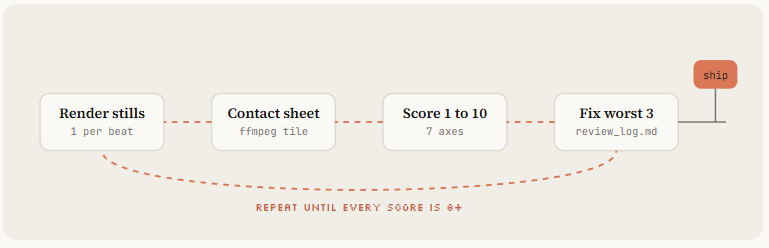
Figure: Render stills → contact sheet → score 1–10 → fix worst 3 → repeat until every score is 8+ → ship
Launch-day piece, 1.7M views, with visible cleanup rounds. Iteration is the method. Pair it with the next embed.
发布日片子,170 万播放,清理轮次看得见。迭代就是方法。和下一条嵌入对照看。
Watercolor short, openly not one-shot: 163 model calls, about 6¾ hours. The honest counterweight to “one prompt” claims.
水彩短片,公开不是 one-shot:163 次调用,约 6¾ 小时。对「一句 prompt」说法的诚实对冲。
Embedded X post: https://x.com/i/status/2103485566570369333
12. Ship — formats, a skill, and a service
12. Ship —— 多画幅、一个 skill、一门生意
Three last moves turn a good clip into a repeatable business. Export every format from one timeline. Package your pipeline as a skill so the next video is a sentence. And, if you want, do what achxvi did the same week: sell it.
最后三步,把一条好片子变成可复用的生意。从一条时间线导出所有画幅。把管线打成 skill,下一条片子就变成一句话。以及,如果你愿意,学 achxvi 同一周做的事:把它卖掉。
Every format from one timeline
一条时间线,所有画幅
Write the scenes against a layout function, not fixed pixels, and ask Opus to render 9, 1 and 16 in parallel.
场景对着 layout 函数写,而不是写死像素;让 Opus 并行渲 9、1 和 16。
The MakerMap spec asked for exactly this. Reframe type and UI per format, don’t crop a 16 render to vertical.
MakerMap 规格要的就是这个。按画幅重排文字和 UI,别把 16 裁成竖屏。
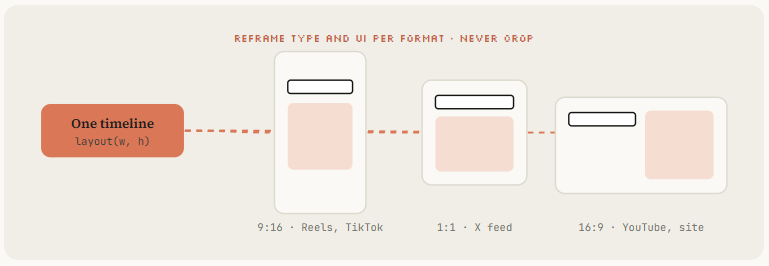
Figure: REFRAME TYPE AND UI PER FORMAT · NEVER CROP — layout(w, h) → 9:16 / 1:1 / 16:9
Package it as a skill
打成 skill
---
name: motion-reel
description: Make a product or showreel motion video rendered from code. Use when the
  user asks for a launch video, showreel, product reel, animated explainer or motion ad.
---

# Motion reel

## Inputs to collect first
Product + URL, duration, formats (9:16 / 1:1 / 16:9), brand colors + fonts,
a reference (frame, video or image folder), music (file or "synthesize").

## Pipeline
1. Gather assets from the URL with Playwright into ./assets. List them.
2. If a reference exists, write docs/style_guide.md from it.
3. Measure or synthesize music. beats.py → beats.json.
4. Write docs/shotlist.md on the beat grid. Show it and wait for OK.
5. Build index.html with window.seek(t) using lib/motion.js springs. Follow CLAUDE.md.
6. Contact sheet → critique-pass (see prompts/critique-pass.txt) → fix. 3 rounds minimum.
7. node render.mjs → sfx.mjs → mix to -14 LUFS → out/final.mp4, all formats.
8. Deliver final.mp4, contact.png, poster.png. Say what you'd improve next.

## Hard rules
- Real product UI only. Never invent screens.
- No Math.random, no timers, no CSS transitions in render mode.
- Banned: corner labels, centered title on gradient, everything fading in.
Now the whole course collapses into /motion-reel for [URL], 20s, vertical, reference ./refs/frame.png. Share the skill folder with your team or publish it as a plugin like buildwithhanif did.
于是整门课收成一句:/motion-reel for [URL], 20s, vertical, reference ./refs/frame.png。把 skill 文件夹分给团队,或像 buildwithhanif 那样发成插件。
Turn it into revenue
变成收入
achxvi’s offer is a good template: music, a mascot in any style, product features, an offer at the end, any language, up to 3 edits.
achxvi 的报价是个好模板:配乐、任意风格吉祥物、产品功能、片尾 offer、任意语言、最多 3 轮修改。
Tony Dinh’s number anchors the price: people paid around $1,000 for this a year ago. A skill plus a critique loop lets you deliver in an afternoon.
Tony Dinh 的数字锚定了价格:一年前这事人们付大约 1000 美元。一个 skill 加一条 critique loop,你能一下午交付。
38-second vertical product film in 45 minutes, plus the reply offering it as a paid service. The “turn it into revenue” proof.
45 分钟做出 38 秒竖屏产品片,回复里再把它当付费服务报价。「变成收入」的实证。
Embedded X post: https://x.com/i/status/2103082510607610023
Repos to clone
值得 clone 的仓库
- Music video: https://github.com/JohnHeibel/PDoomVideo
- Starter: https://github.com/JohnHeibel/ClaudeAnimationBase
- Node canvas: https://github.com/buildwithhanif/claude-animation-skill
- Framework (html): https://github.com/heygen-com/hyperframes
- Framework (react): https://www.remotion.dev/docs/ai/skills
- Long form: https://github.com/WinterArc21/Battle-of-Austerlitz-Film
- Prompt library: https://github.com/guanmo-ai/awesome-ai-motion
- Dataset: https://github.com/athemeroy/awesome-opus-5-5-videos
- MV:https://github.com/JohnHeibel/PDoomVideo
- 起步模板:https://github.com/JohnHeibel/ClaudeAnimationBase
- Node canvas:https://github.com/buildwithhanif/claude-animation-skill
- 框架(HTML):https://github.com/heygen-com/hyperframes
- 框架(React):https://www.remotion.dev/docs/ai/skills
- 长片:https://github.com/WinterArc21/Battle-of-Austerlitz-Film
- Prompt 库:https://github.com/guanmo-ai/awesome-ai-motion
- 数据集:https://github.com/athemeroy/awesome-opus-5-5-videos
Conclusion
结语
The one-liner gets you a clip. The harness gets you a studio.
一句话换来片子。Harness 换来工作室。
Install the stack, steal a reference, write the state list, own the seek(t) engine, and make Opus watch its own frames until every score is 8.
装好栈,偷一份参考,写状态清单,拿下 seek(t) 引擎,让 Opus 回看自己的帧直到每项 8 分。
Then package it as a skill and never write the long prompt again.
然后打成 skill,再也不写那份长 prompt。
Follow my Substack to get the latest articles on AI, vibe-coding, and agentic systems.
关注我的 Substack,拿 AI、vibe-coding 与 agentic systems 的最新文章。
→ 上一篇:(三)seek(t) 引擎、弹簧与配乐 · 系列首页:用 Opus 5.5 搭动态设计工作室
→ 上一篇:(三)seek(t) 引擎、弹簧与配乐 · 系列首页:用 Opus 5.5 搭动态设计工作室
讨论
这里是静态站点,没有内嵌评论区。如果这篇文章对你有用,欢迎通过 RSS 订阅后续更新。